Agent基础概念

Agent与传统程序的区别

  • 传统程序与智能体程序的区别:

    • 传统程序:输入固定的指令,输出固定的结果
    • 智能体:更像一个拥有思考能力的助手
  • 传统程序的示例:计算器

1
2
3
4
5
6
def calculator(a,b,operator):
if operator == "+":
return a+b
elif operator == "-":
return a-b
print(calculator(a,b,operator))
  • Agent智能体的示例:个人助手
1
2
3
4
5
6
7
8
9
10
def personal_agent(user_input):
# 感知: 理解用户需求
intent = understand_intent(user_input)
if intent == "天气查询":
plan = "调用天气API"
elif intent == "日程安排":
plan = "查询日历并推荐时间"
return execute_plan(plan) # 行动:执行操作

print(personal_agent("明天适合户外活动吗?")) # 自动判断需要调用天气查询

Agent核心能力

  • 感知引擎:像人类的眼睛耳朵

    • 自然语言理解:帮助我订一个酒店。动作:预定。对象:酒店。条件:低价。
    • 多模态输入:文本、语音、图像
  • 决策大脑:像人类思考判断

    • 基于LLM的推理能力
    • 根据选择的策略进行调用API搜索知识库
  • 执行器官:像人类的手脚

    • API调用以获取实时数据
    • 工具执行操作外部系统
    • 输出生成的图像语音图像响应
  • 示例如下:

1
2
3
4
5
6
7
8
9
10
def make_decision(user_input):
if "天气" in user_input:
# 调用天气相关的工具,如天气查询
return call_weather_tool(user_input)
elif "计算" in user_input:
# 调用计算工具,比如科学计算器,二进制计算器
return call_calculator(user_input)
else:
# 使用LLM生成回复
return lll_generate(user_input)

Agent技术演进

  • 2016年的Siri到至今的Agents,技术栈大致经历了三次革新:
时代 核心技术 局限性
第一代 规则引擎+固定模版 只能处理预设问题
第二代 NLP模型+意图识别 无法执行复杂操作
第三代 LLM+工具调用+记忆系统 全能但需优化稳定性
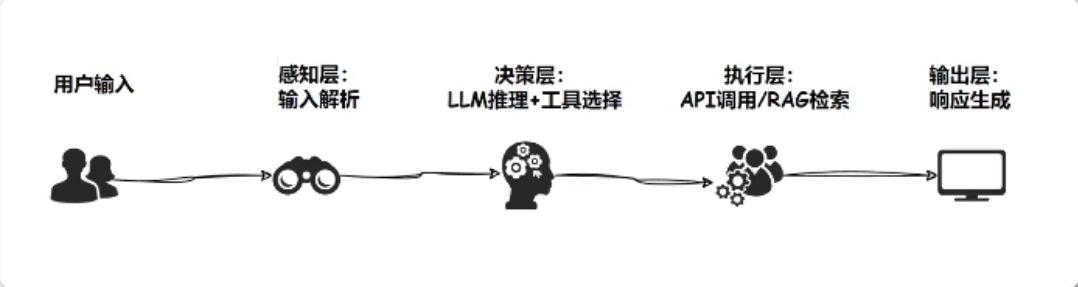
  • 当前最先进的Agent架构:

image-20260408232558290

Agent应用场景与技术栈

  • Agent应用场景有:客服助手、数据分析家、个人效率管家
  • 现代Agent开发四大支柱技术:
    • 大语言模型LLM:大脑皮层
      • 主流选择:GPTClaudellama3Deepseek
      • 作用:理解、推理、内容生成
    • 工具调用Tool Calling
    • 记忆系统Memory
      • 短期记忆:对话上下文
      • 长期记忆:用户偏好,知识库
    • RAG检索增强:外部知识连接器
      • 解决LLM知识静态性问题
      • 实时获取最新信息
  • Agent传统程序的再次对比分析:
1
2
3
4
5
6
7
8
9
10
11
12
13
14
15
16
17
18
# 传统程序(固定流程)
def travel_planner(destination):
print(f"已为您预定{destination}的机票")
print("推荐景点: 自由广场")

travel_planner("巴黎")

# 智能体程序(动态响应)
def smart_travel_agent(request):
# 简单意图识别
if "便宜" in request:
return "推荐经济型酒店: Travelodge"
elif "豪华" in request:
return "推荐五星级酒店: 丽思卡尔顿"
else:
return "为您推荐当地最受欢迎的景点"

print(smart_travel_agent("想要豪华酒店"))

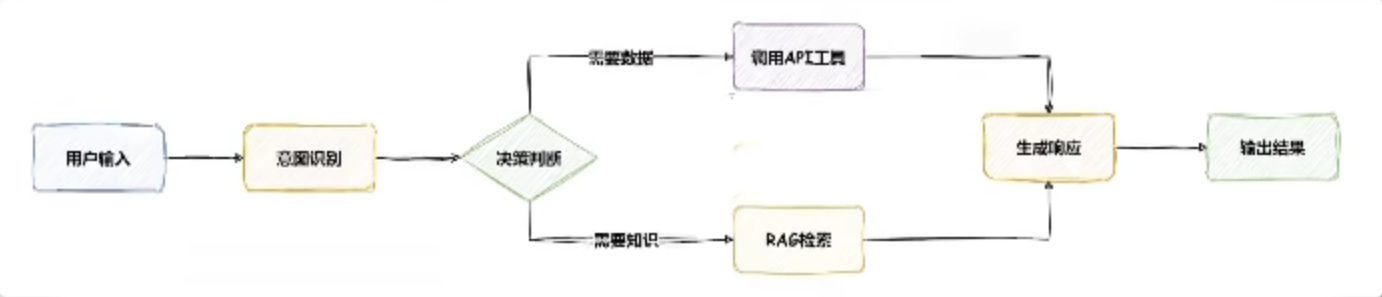
Agent工作流程

image-20260408233754747

Agent常用技术之LLM

Agent常用技术之LangChain

LangChain初步理解

  • 了解LangChain的相关网站,LangChain中文网:LangChain中文网 - 跟着LangChain学AI开发

  • LangChain介绍:

    • LangChain是一个开源框架,简单来说,它帮助开发者更方便地构建基于大语言模型的智能应用。把它想象城一个工具箱,专门用来让Agent更聪明、更能干。它不是Agent本身,而是让Agent开发更顺手的工具集合。
    • LangChain解决的是LLM的一些短板,让Agent能干更多事,比如:
      • 连接外部数据:LLL脑子里装的知识是静态的,LangChain能让它查数据库、搜索网页、调用API,获取最新信息。
      • 记东西:它能帮助Agent记住对话上下文(短期记忆)或者用户偏好(长期记忆),让交互更个性化。
      • 用工具:LangChainAgent能调用各种工具,比如计算器、天气API、甚至跑Python代码。
      • 复杂任务拆解:它能把用户的大需求拆成小步骤,逐步搞定。
    • 注解LangChain本质上是框架,也就是一个编程语言的包,主要支持PythonNode.js(TypeScript),所以我们一般就是使用Python或者Node.js作为编程语言进行开发
  • LangChainAgent的关系:

    • LangChain很想Agent的万能工具箱,但是没有那么万能,它提供了很多现成的模块,比如:
      • Chain:把多个操作串起来,比如先理解用户意图,再查数据,最后生成答案。
      • 工具Tools:让Agent能用外部功能,比如搜索、计算、翻译。
      • 记忆Memory:存储对话历史或用户数据
      • 检索RAG:从知识库或网上抓取最新信息。
    • LangChain的局限:
      • 不是开箱即用:得开发者自己搭配合适的模块和LLM
      • 性能依赖LLM:如果底层的LLM不够强,LangChain再好也有限
      • 复杂场景还得定制:比如超复杂的任务流,可能还得自己写代码
    • 核心优势:无需重复造轮子,标准化开发流程。

LangChain环境搭建

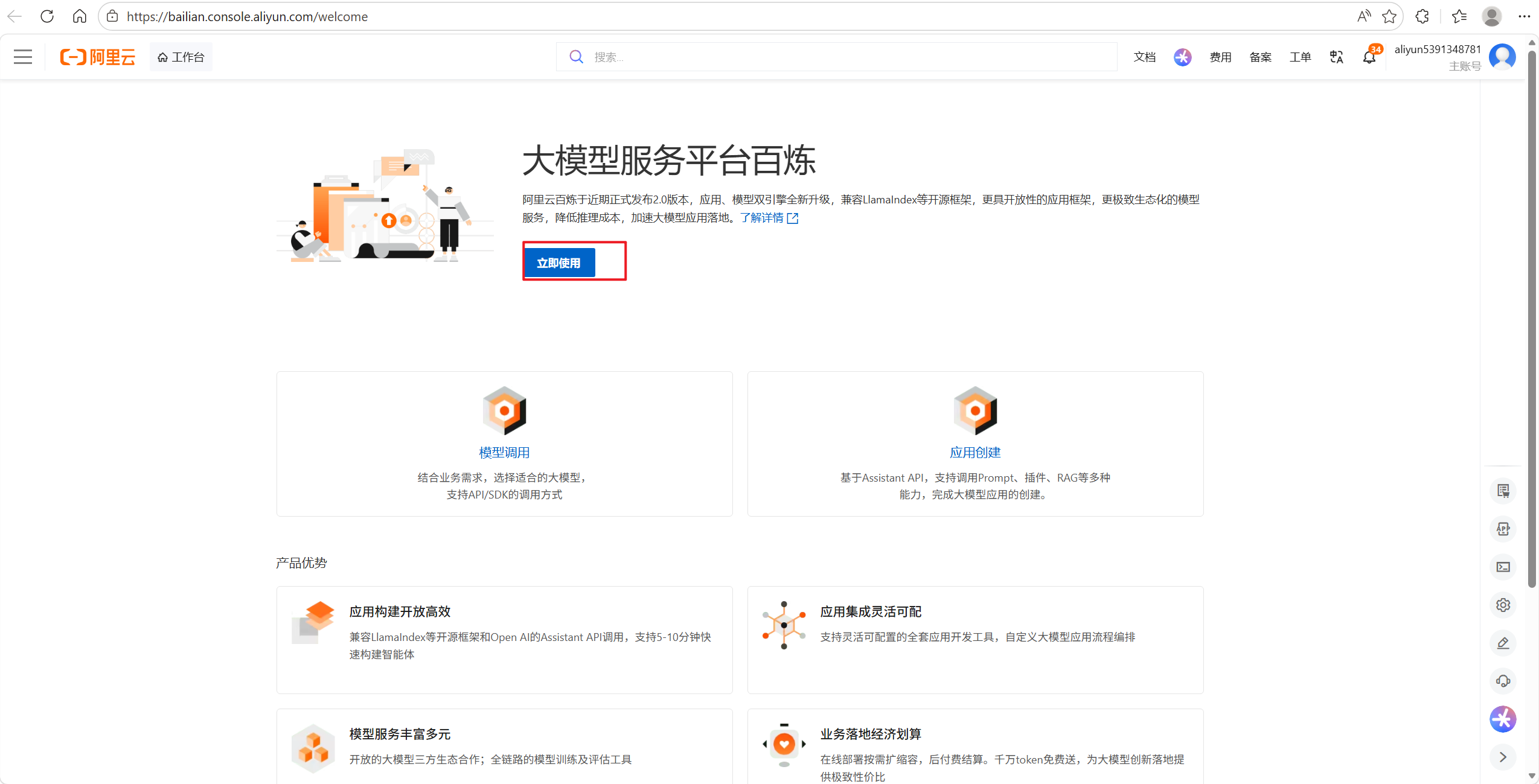
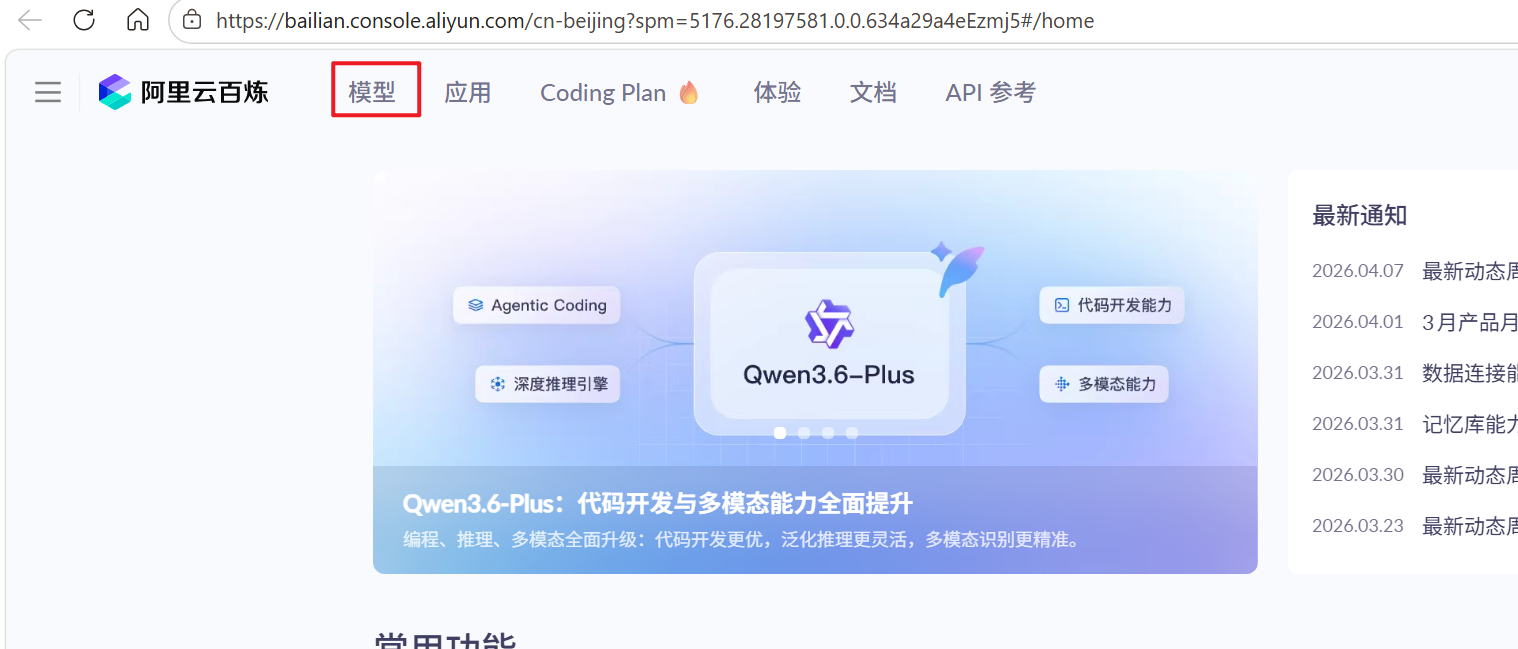
  • 了解完LangChain的一些基本概念和功能之后接下来就是环境搭建了。直接使用Conda创建虚拟环境,在虚拟环境中下载LangChain的这个包,以通义千问为例子。
  • 创建虚拟环境:
1
conda create -n agent_env python=3.12
  • 安装LangChain这里直接安装最新版:
1
pip install langchain-community
  • 以及下载模型API调用库:
1
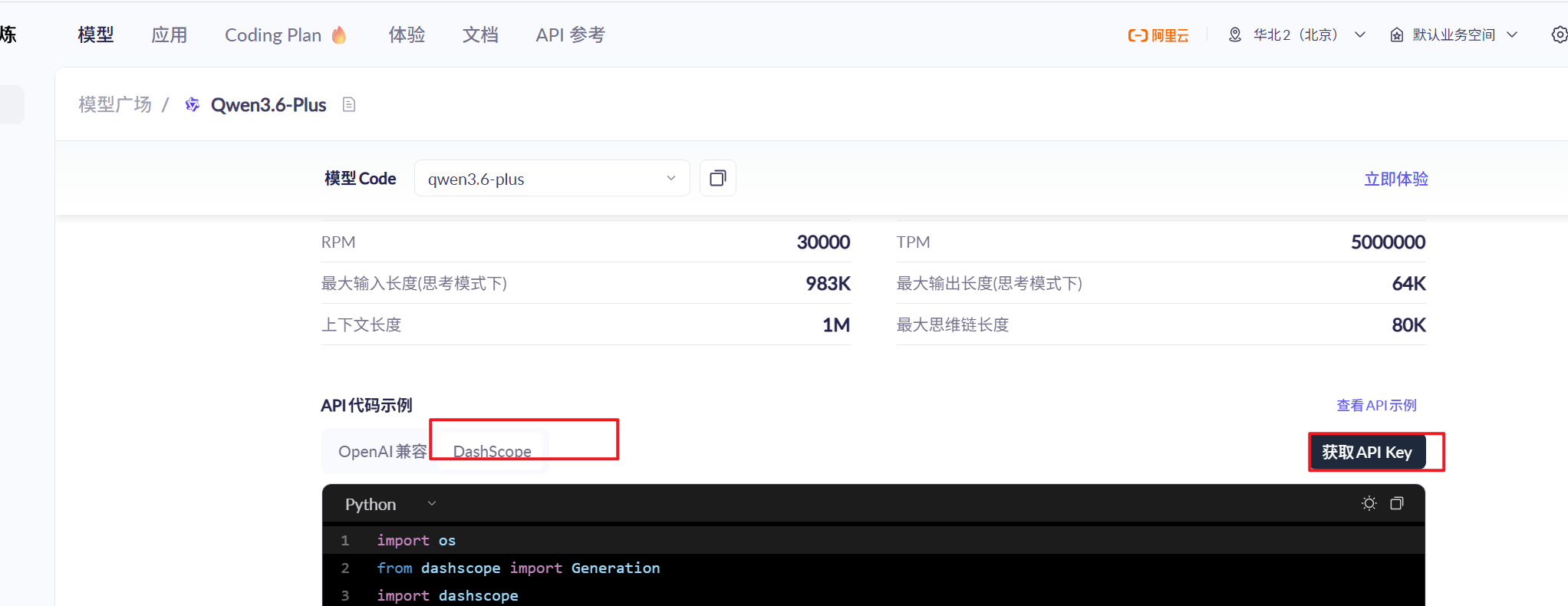
pip install dashscope==1.23.7

image-20260409081832750

image-20260409081845864

image-20260409081903514

image-20260409082005919

  • 成功搭建环境后的小示例:
1
2
3
4
5
6
7
from langchain_community.llms import tongyi
key = ""

llm = tongyi.Tongyi(api_key=key)
# 调用模型使用
response = llm.invoke("夏天适合吃什么水果?")
print(response)

LangChain类之提示词模版

  • LangChain的提示词模版引擎Prompt Template Engine是其核心组件之一,主要用于构建和管理打语音模型LLM交互的提示词Prompt
  • 它的作用是将用户的输入或动态数据结构化地嵌入到预定义的模版中,从而生成适合模型处理的提示词,提升模型输出的准确性和一致性。
  • 示例1:
    • 使用一个模版定义提示词
    • 使用langchain_core.promptsPromptTemplate中的format提示词替换
    • 使用langchain_core.promptsPromptTemplate中的invoke提示词替换
1
2
3
4
5
6
7
8
9
10
11
12
13
14
15
16
17
18
from langchain_community.llms import tongyi
from langchain_core.prompts import PromptTemplate
key =
llm = tongyi.Tongyi(api_key=key)

# 定义模版
template = '你是一个{role},请用{style}风格回答问题:{question}'
# 创建模版对象
prompt_template = PromptTemplate.from_template(template)
"""
提示词使用方法1: 变量使用format方法替换
filled_prompt = prompt_template.format(role='数学老师',style='通俗易懂',question='勾股定理是什么?')

提示词使用方法2: 变量使用invoke方法替换
filled_prompt = prompt_template.invoke({ "role": "数学老师", "style": "通俗易懂", "question": "勾股定理是什么?" })
"""
# 调用模型响应数据
print(llm.invoke(filled_prompt))
  • 示例2:
    • 使用多个句子定义提示词
    • 使用langchain_core.prompts中的ChatPromptTemplate中的format_message填充变量
    • 使用langchain_core.prompts中的ChatPromptTemplate中的invoke填充变量
1
2
3
4
5
6
7
8
9
10
11
12
13
14
15
16
17
18
19
20
21
from langchain_community.llms import tongyi
from langchain_core.prompts import ChatPromptTemplate
key =
llm = tongyi.Tongyi(api_key=key)

# 定义模版
sys_template = "你是一个数学老师,请以{style}的风格回答问题"
user_template = "请用简单易懂的方式解释:{question}"


# 创建模版对象
prompt_template = ChatPromptTemplate.from_messages([
('system',sys_template),
('human',user_template)
])

# 填充变量
#prompt = prompt_template.format_messages(style='生动有趣',question='勾股定理是什么?')
prompt = prompt_template.invoke({"style":"生动有趣","question":"勾股定理是什么?"})
# 调用模型响应数据
print(llm.invoke(prompt))

LangChain类之输出格式化

  • LangChain中,输出格式化Output Parsing是关键功能之一,用于将大语言模型LLM的原始输出通常是自由格式的文本,解析为结构化的数据格式,如JSON、字典或自定义对象。这不仅便于后续处理,还能提高输出的可读性和一致性。

  • LangChain输出的格式化要注意两个地方:

    • 首先就是langchainoutput_parsers库的StructuredOutputParser,ResponseSchema这两个类已经被弃用了,所以不支持这个输出格式化方式
    • 现在推荐使用的是langchainoutput_parsers库的PydanticOutputParser进行输出格式化
  • 示例如下:

1
2
3
4
5
6
7
8
9
10
11
12
13
14
15
16
17
18
19
20
21
22
23
24
25
26
27
28
29
30
31
32
33
34
35
36
37
from langchain_core.output_parsers import PydanticOutputParser
from langchain_community.llms import tongyi
from pydantic import BaseModel, Field
from langchain_core.prompts import PromptTemplate

key =
llm = tongyi.Tongyi(api_key=key)


# 定义输出模版
class Person(BaseModel):
name: str = Field(description="人的姓名")
age: int = Field(description="人的年龄")


# 创建输出解析器
output_parser = PydanticOutputParser(pydantic_object=Person)

# 创建提示词模版,包含格式化指令
template = """你是一个信息提取助手,请从以下文本中提取姓名和年龄,并以JSON格式返回:
文本: {input_text}
{format_instructions}"""

prompt = PromptTemplate(
template=template,
partial_variables={"format_instructions": output_parser.get_format_instructions()}
)

# 填充输入
input_text = "张三今年25岁,来自北京"
filled_prompt = prompt.format(input_text=input_text)

# 获取输出
response = llm.invoke(filled_prompt)
print(response)
parsed_output = output_parser.parse(response)
print(parsed_output)

LangChain类之链式调用

  • LangChain中,LLMchain是一个核心对象,用于实现大语言模型的链式调用。它将提示词模版、语言模型以及可选的输出解析器组合在一起,形成了一个可重复执行的流程,简化了与LLM的交互。

  • LLLChain的核心组件:

    • PromptTemplate
      • 定义提示词模版,包含占位符,如{input},用于动态生成提示词
      • 示例:请用{style}风格解释:{question}
    • LLM:大语言模型,负责根据提示词生成输出
    • OutputParser(可选):用于将LLM的原始文本输出解析为结构化格式如json格式
    • Memory:可集成上下文记忆,支持对话历史管理
  • 注意:langchain.chains中的LLMChain在新版的LangChain已经不能使用了,需要使用|也就是管道输出符号进行链式调用的定义

  • 示例如下:

1
2
3
4
5
6
7
8
9
10
11
12
13
14
15
16
17
18
19
20
21
22
23
24
25
26
27
28
29
30
31
32
33
from langchain_community.llms import tongyi
from langchain_core.prompts import PromptTemplate
from langchain_core.output_parsers import PydanticOutputParser
from pydantic import BaseModel, Field

key =

llm = tongyi.Tongyi(api_key=key)
# 定义输出结构
class response_schema(BaseModel):
answer: str = Field(description="问题的答案")
confidence: float = Field(description="答案的置信度,取值范围0-1")

# 创建输出解析器
output_parser = PydanticOutputParser(pydantic_object=response_schema)


# 定义提示词模版
template = """你是一名数学老师,请用{style}的风格回答以下问题,并以 JSON 格式返回答案和置信度:
问题: {question}
{format_instructions}"""


prompt = PromptTemplate(
template= template,
partial_variables={"format_instructions": output_parser.get_format_instructions()}
)

# 创建LLMchain
llm_chain = prompt | llm | output_parser # 推荐写法

response = llm_chain.invoke({"style": "通俗易懂", "question": "勾股定理是什么?"})
print(response)

LangChain类之流式输出

  • 流式输出是指在用户输入问题后,AI模型边生成边显示响应内容,逐步展示AI思考过程,而不是等待所有内容生成完毕后再一次返回完整答案。
  • 与传统非流式输出相比,流式输出的差异如下表所示:
模式 特定
普通输出(非流式) 用户提交问题\rightarrow等待几秒\rightarrow一次性返回完整答案
流式输出 用户提交问题\rightarrowAI边生成边显示\rightarrow逐步输出答案
  • 示例如下:
1
2
3
4
5
6
7
8
9
10
11
12
13
14
15
16
17
18
19
20
21
22
23
24
25
26
27
28
29
30
31
32
33
34
35
36
from langchain_community.llms import tongyi
from langchain_core.prompts import PromptTemplate
from langchain_core.output_parsers import PydanticOutputParser
from pydantic import BaseModel, Field

key =

llm = tongyi.Tongyi(api_key=key)
# 定义输出结构
class response_schema(BaseModel):
answer: str = Field(description="问题的答案")
confidence: float = Field(description="答案的置信度,取值范围0-1")

# 创建输出解析器
output_parser = PydanticOutputParser(pydantic_object=response_schema)


# 定义提示词模版
template = """你是一名数学老师,请用{style}的风格回答以下问题,并以 JSON 格式返回答案和置信度:
问题: {question}
{format_instructions}"""


prompt = PromptTemplate(
template= template,
partial_variables={"format_instructions": output_parser.get_format_instructions()}
)

# 创建LLMchain
llm_chain = prompt | llm # 推荐写法

chunks = [] #存储输出

for chunk in llm_chain.stream({'style': '详细讲解10000字','question': '勾股定理是什么?'}):
chunks.append(chunk)
print(chunk,end="",flush=True)

Langchain记忆系统

  • 与LLM对话系统中,每次交互调用API都是处理无状态的处理,导致对话缺乏连贯性。LangChain的记忆系统通过以下方式解决这个问题。

注意:

  1. 虽然目前看到许多聊天机器人都是由记忆的,是因为借助了代码的帮助,提供了历史消息作为和LLM对话的上下文。
  2. 所以就可以基于之前说过的会话内容,再生成新的内容。从而感觉好像记得说过的话
  • 记忆系统的作用:
    • 上下文的保证:记住用户之前的输入和系统的输出
    • 个性化交互:存储用户偏好和关键信息
    • 长期学习:积累历史交互数据用于改进后续响应

注意:随着历史内容的变多,tokens的数量也会变多,而平台的计费方式往往是通过tokens的数量来计算的。

  • LangChain中记忆系统有以下这些:
    • ConversationBufferMemory缓冲记忆
    • ConversationBufferWindowMemory窗口记忆
    • ConversationTokenBufferMemoryToken限制记忆
    • ConversationSummaryMemory摘要记忆
    • ConversationSummaryBufferMemory摘要 + 原始混合
    • ConversationEntityMemory实体记忆
    • CombinedMemory组合记忆
    • VectorStoreRetrieverMemory向量数据库记忆
  • 但是在Langchain v1版本中上面这些已经被移除了,所以这块不学了。
  • Langchain v1中出现了三种记忆代替方案:
    • 短期记忆:使用的是messages
    • 长期记忆:使用的是向量库+检索
    • 复杂记忆:使用的是LangGraph

短期记忆

LangChain文本嵌入模型

  • 文本嵌入大致介绍:

    • 文本嵌入是将文本转换为固定长度的数值向量表示
    • 这些向量捕捉文本的语义信息,相似语义的文本在向量空间中距离较近
    • 例如:
      • Hi there!Oh, Hello!的向量相似度高
      • What's your name?My friends call me world的向量相似度低
    • 计算机对自然语言理解不够,但是可以处理数字,通过这些向量,电脑就能理解文字的含义
  • 可以使用文本嵌入做如下事情:

    • 找相似的内容:让计算机明白哪些文字意思解决,比如搜索的时候不只是找关键词,电脑就能理解文字的含义
    • 分类文字:比如看一条评论是好评还是差评,电脑通过向量就能判断
    • 推荐东西:像推荐文章、电影,基于内容的意思来推荐,而不是盲目推荐
    • 跨语言:中文、英文都能够转成向量,意思相近的还能凑一块儿。
  • 示例如下:

1
2
3
4
5
6
7
8
9
10
11
12
13
14
15
16
17
18
19
20
21
22
23
24
25
26
27
28
29
30
31
32
33
34
# 网络版文本嵌入模块
import os

from langchain_community.chat_models import ChatZhipuAI
from langchain_core.messages import SystemMessage, HumanMessage
from langchain_core.prompts import ChatPromptTemplate
from langchain_community.embeddings import ZhipuAIEmbeddings
from sklearn.linear_model import LogisticRegression
key =
os.environ['ZHIPUAI_API_KEY'] = key
chat = ChatZhipuAI(
model="glm-5.1",
temperature=0.5
)
# 加载模型
embeddings = ZhipuAIEmbeddings(model="embedding-2")
# 准备评论
comments = ["这个产品太棒了!","一天就坏了,垃圾!"]

vectors = embeddings.embed_documents(comments)
#print(f"向量的维度: {len(vectors[0])}")
#print(f"向量: {vectors[0]}")


test_conmment = ["这个东西超好用!"]
test_vector = embeddings.embed_documents(test_conmment)
print(f'向量: {test_vector[0]}')


labels = [1, 0] # 1表示正面评论,0表示负面评论
clf = LogisticRegression().fit(vectors, labels)
# 预测
prediction = clf.predict(test_vector)
print("好评" if prediction[0] == 1 else "差评")

LangChain工具封装

  • LangChain工具调用原因:

    • 解决LLM的局限性:大语言模型存在幻觉问题,且无法直接访问实时数据或执行具体操作
    • 扩展能力边界:通过工具集成,Agent可以获得计算、API访问、数据库查询等实际能力
    • 模块化设计:将不同功能封装为独立工具,便于维护和复用
  • LangChain工具开发核心组件@tool装饰器:

    • 用于将普通python函数转换为Langchain工具
    • 自动生成JSON Schema,描述工具的输入参数和输出参数,
  • 示例如下:

1
2
3
4
5
6
7
8
9
10
11
from langchain.tools import tool

@tool
def multiply(a: int, b: int) -> int:
"""2个数的乘积"""
return a * b

print(multiply.name)
print(multiply.description)
print(multiply.args)
print(multiply.args_schema.model_json_schema())
  • JSON Schema的规范如下:

    • 工具的输入参数需要明确类型,如strint
    • 文档字符串docstring描述工具功能,Agent依靠此判断是否调用
  • JSON Schema的示例如下:

1
2
3
4
5
6
7
8
9
10
{
'description': '2个数的乘积',
'properties': {
'a': {'title': 'A', 'type': 'integer'},
'b': {'title': 'B', 'type': 'integer'}
},
'required': ['a', 'b'],
'title': 'multiply',
'type': 'object'
}

Agent实战

实战1——天气查询工具

  • 案例背景:

    • 目标:开发一个天气查询工具,供Agent调用
    • 数据源:APISpace(免费,需注册获取API key
    • 功能:输入城市名,返回实时温度和天气状况
  • 环境准备:

  • 工具实现代码:

1
2
3
4
5
6
7
8
9
10
11
12
13
14
15
16
17
18
19
20
21
22
23
24
25
26
27
28
29
30
31
32
33
34
35
36
37
38
39
40
41
42
43
44
45
46
47
48
49
50
51
import requests
import pandas as pd
from langchain.tools import tool

@tool
def get_weather(city: str) -> str:
"""
调用实时天气API,返回温度即天气状况
参数:
city: 城市名称 ,如: '北京'
"""
url =
city_code = get_city_code(city)
payload = {"areacode" : city_code,"lonlat" : "116.407526,39.904030"}

headers = {
"X-APISpace-Token":"myp3fxvwiqu9si8fdfsmy2xjlb2piggr"
}

response = requests.request("GET", url, params=payload, headers=headers)
# 将结果转换为json数据
data = response.json()
# 提取温度和天气状况
temp = data.get('result').get('realtime').get('temp')
weather = data.get('result').get('realtime').get('text')
return f'天气:{weather}, 温度: {temp}°C'

# 获取城市编码
city_df = pd.read_csv("city.csv")
def get_city_code(city_name: str) -> str:
"""
获取城市编码
"""
# 优先匹配区县
match = city_df[city_df['district'] == city_name]
if not match.empty:
return match.iloc[0]['areacode/城市ID']

# 匹配城市
match = city_df[city_df['city'] == city_name]
if not match.empty:
return match.iloc[0]['areacode/城市ID']

# 匹配省份
match = city_df[city_df['city'].str.contains(city_name, na=False)]
if not match.empty:
return match.iloc[0]['areacode/城市ID']
# 默认北京编码
return 101010100

print(get_weather("太原"))

实战2——调用工具

  • LangChain工具调用机制:
    • LangChain通过@tool装饰器将Python函数转换为Agent可调用的工具
    • 工具定义遵循Json Schema规范,确保结构化输入与输出
    • Agent通过提示词Prompt决定合适调用哪个工具
    • 流程如下:
      • 用户输入,Agent解析意图
      • 匹配工具,执行函数
      • 返回结果,整合到Agent响应
  • 示例如下:
1
2
3
4
5
6
7
8
9
10
11
12
13
14
15
16
17
18
19
20
21
22
23
24
25
26
27
28
29
30
31
32
33
34
35
36
37
38
39
40
41
42
43
44
45
46
47
48
49
50
51
52
53
54
55
56
57
58
59
60
61
62
63
64
65
66
67
68
69
70
71
72
73
74
75
76
77
78
79
80
81
82
from langchain.agents import create_agent
from langchain_community.chat_models import ChatZhipuAI


import requests
import pandas as pd
import os
from langchain.tools import tool

key =
os.environ['ZHIPUAI_API_KEY'] = key
chat = ChatZhipuAI(
model="glm-5.1",
temperature=0.5
)


@tool
def get_weather(city: str) -> str:
"""
调用实时天气API,返回温度即天气状况
参数:
city: 城市名称 ,如: '北京'
"""
url =
city_code = get_city_code(city)
payload = {"areacode" : city_code,"lonlat" : "116.407526,39.904030"}

headers = {
"X-APISpace-Token":"myp3fxvwiqu9si8fdfsmy2xjlb2piggr"
}

response = requests.request("GET", url, params=payload, headers=headers)
# 将结果转换为json数据
data = response.json()
# 提取温度和天气状况
temp = data.get('result').get('realtime').get('temp')
weather = data.get('result').get('realtime').get('text')
return f'天气:{weather}, 温度: {temp}°C'

# 获取城市编码
city_df = pd.read_csv("city.csv")
def get_city_code(city_name: str) -> str:
"""
获取城市编码
"""
# 优先匹配区县
match = city_df[city_df['district'] == city_name]
if not match.empty:
return match.iloc[0]['areacode/城市ID']

# 匹配城市
match = city_df[city_df['city'] == city_name]
if not match.empty:
return match.iloc[0]['areacode/城市ID']

# 匹配省份
match = city_df[city_df['city'].str.contains(city_name, na=False)]
if not match.empty:
return match.iloc[0]['areacode/城市ID']
# 默认北京编码
return 101010100

# 创建工具对象
tools = [get_weather]
# 获取提示词
#prompt = ChatPromptTemplate.from_messages([
# ("system", "你是一个智能助手,可以调用工具解决问题"),
# ("human", "{input}"),
# ("placeholder", "{agent_scratchpad}")
#])

# 创建智能体
agent = create_agent(
model = chat,
tools = tools,
system_prompt="你是一个可以调用工具的助手"
)


result = agent.invoke({"messages": [{"role": "user", "content": "今天北京的天气怎么样?"}]})
print(result)

RAG索引增强生成

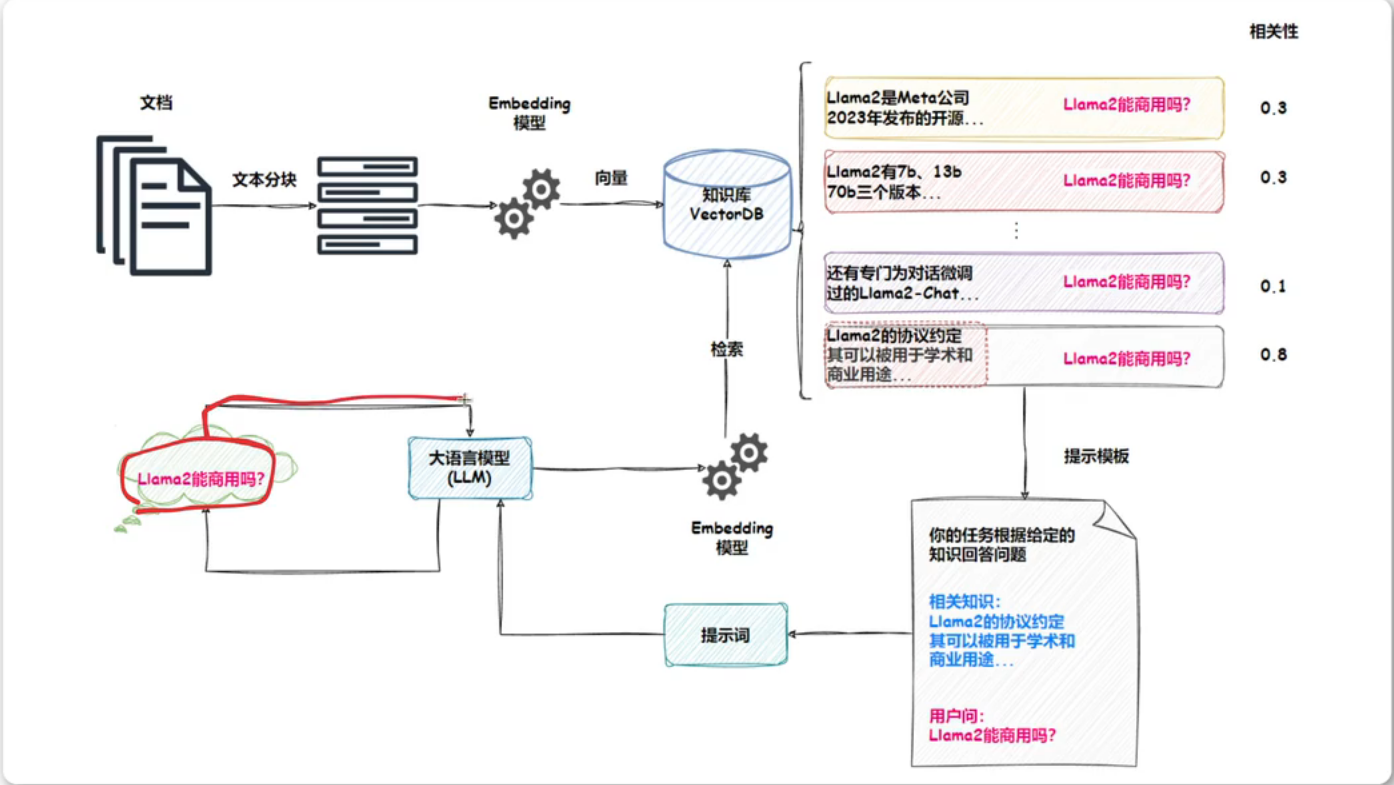
  • RAG英文全称为Retrieval-Augmented Generation,检索增强生成是一种将信息检索和文本生成相结合的AI技术。例如,我们向LLM提问一个问题,RAG从各种数据源检索相关信息,并将检索到的信息和问题注入到LLM提示中,LLM最后给出答案。
  • 出现RAG的原因:当我们将大模型应用于实际业务场景时就会发现,通用的基础大模型基本无法满足我们的实际业务需求,主要有以下几个方面:
    • 知识的局限性:模型自身的知识完全源于它的训练数据,而现有的主流大模型基本都源于网络公开的数据,对于一些实时性的、非公开的或离线的数据是无法获取到的。这部分知识也就无从具备。
    • 幻觉问题:所有AI模型的核心基于数学概率,输出本质是一系列数值运算,大模型也不例外。因此,在知识欠缺或不擅长的领域,大模型可能一本正经地输出错误信息。这种幻觉问题难以辨别,因为它要求使用者具备相关领域知识。
    • 数据安全性:对于企业而言,数据安全至关重要,没有企业原因冒着数据泄露风险将私域数据上传至第三方平台进行训练。因此,完全依赖通用大模型的应用方案往往需在数据安全与效果之间权衡。
  • RAG的工作原理如下:
    • 核心思想在LLM回答用户问题之前,先进行一次信息检索。这个过程通常分为以下几个主要步骤
      • 用户查询
      • 知识库
      • 检索
      • 增强提示词
      • 生成
    • 想像你是一名学生,需要回答一道复杂的历史问题。
      • 没有RAG:你只能凭借记忆回答,如果问题超出了你的记忆范围,你可能会胡编乱造
      • 有了RAG:你会先去图书馆,查找相关历史书籍,然后阅读书中的相关章节,最后结合自己的理解来回答问题。
  • RAG原理图片如下:

image-20260413001625656

RAG系统搭建流程

  • RAG搭建流程如下:
    • 收集数据
    • 数据分块
    • 选择文本嵌入模型
    • 初始化向量数据库
    • 存储向量
    • 整合大语言模型
  • 示例如下: